
Before buying a fiber optic HDMI cable, verify that its certification information matches the product, check the conditions behind its bandwidth and distance claims, and test it with the equipment you actually plan to connect. “8K,” “48Gbps,” or “HDMI 2.1” on a product listing is not enough to answer all three questions.
These checks establish different things: whether the certification claim can be verified, what supports the advertised performance, and whether the cable suits your installation. A certified cable still needs to work in your actual setup. A black screen or flicker, by itself, does not prove that a cable is counterfeit.
Verify the label, then match the brand, model and length
“HDMI 2.1 cable” is a common search term, but it is not the official cable category name to look for when checking certification. For the category supporting up to 48Gbps, look for Ultra High Speed HDMI Cable. “Fiber optic” describes the cable’s construction; it does not replace the category name or establish certification. Premium High Speed HDMI Cable is a different certification category, supporting up to 18Gbps. See the official HDMI cable categories.
If a supplier claims Ultra High Speed HDMI Cable certification, follow three steps:
- Inspect the actual packaging. Look for the corresponding official certification label and check the official cable name on the outer jacket. A generic HDMI logo, a printed bandwidth number, or a seller’s own “certified” graphic does not replace that label.
- Verify the label using the current official process. HDMI’s current guidance allows standard QR code scanning apps. Follow the process described on its cable certification page. A link to a store homepage or a downloadable certificate image alone does not verify the product in front of you.
- Compare the returned details with the cable. Check the brand, model and length, rather than stopping at a “Congratulations” message. A result for a 2-meter model does not establish certification for a different 20-meter cable.
If a label cannot be read, check its condition and retry according to the official instructions. If the information does not match, keep the packaging and verification result, and ask the supplier for an explanation before accepting its certification claim. Contact HDMI through its official channels if the discrepancy remains unresolved.
An unsuccessful verification leaves certification unconfirmed. It does not establish that the cable has never been tested or that it is counterfeit. An isolated laboratory code or certificate number also needs to be tied to the relevant product and scope.
The next step depends on what you find:
| What you find | What to do next |
|---|---|
| Certification details match the product | Check the performance conditions and test the intended setup. |
| Verification is incomplete or details do not match | Request product-specific information. Keep the certification status unconfirmed until the issue is resolved. |
| Certification is verified, but the target mode fails | Investigate the equipment, direction, power and intermediate connections; record the failure. |
| The functional test passes, but certification is unconfirmed | Record the two outcomes separately. A working picture does not replace certification verification. |
Turn “8K,” “48Gbps” and distance claims into specific questions
Next, check whether the specification says enough about the intended application. The same resolution can use different refresh rates, color settings and compression methods, changing the demands on the connection. “Supports 8K” is less useful than a defined video format at a specified cable length.
| Advertised claim | What to check before buying |
|---|---|
| “8K” or “4K120” | Resolution, refresh rate, color depth and color format. Check whether DSC (Display Stream Compression) is used and whether both devices support the required mode. |
| “48Gbps” | The exact model and length, corresponding certification status, and relevant test information. Displaying a picture alone does not verify the full bandwidth. |
| “Up to 100 meters” | Specifications and validation conditions for that length: devices, ports, video mode, power arrangement and results. Shorter-cable records do not establish longer-cable performance. |
| “HDR, VRR or eARC” | Identify the required functions: high dynamic range, variable refresh rate, or enhanced Audio Return Channel. Check both the cable’s specifications and the equipment’s support. |
| “No external power needed” | The model’s power requirements and applicable equipment conditions. Do not assume every source port provides suitable power. |
For example, a record showing a 10-meter sample working at 4K60 tells you about that sample under the recorded conditions. It does not establish that a 30-meter version will work at 4K120. Ask about the model, length and target mode together.
There is also no single maximum length that applies to every HDMI cable. HDMI states that usable length depends on factors such as cable type and construction. “Use fiber beyond 5 meters” and “all fiber cables work reliably at 100 meters” are therefore unsuitable as universal purchasing rules. See the official HDMI specification guidance.
Fiber optic construction can be an option for longer connections. What matters is the capability of the complete cable assembly under the required conditions, including its active electronics and connections at both ends.
Define the actual signal path before ordering
A cable needs to be evaluated as part of the installation. Start by identifying the source, every intermediate device, and the display. Then document each connection.
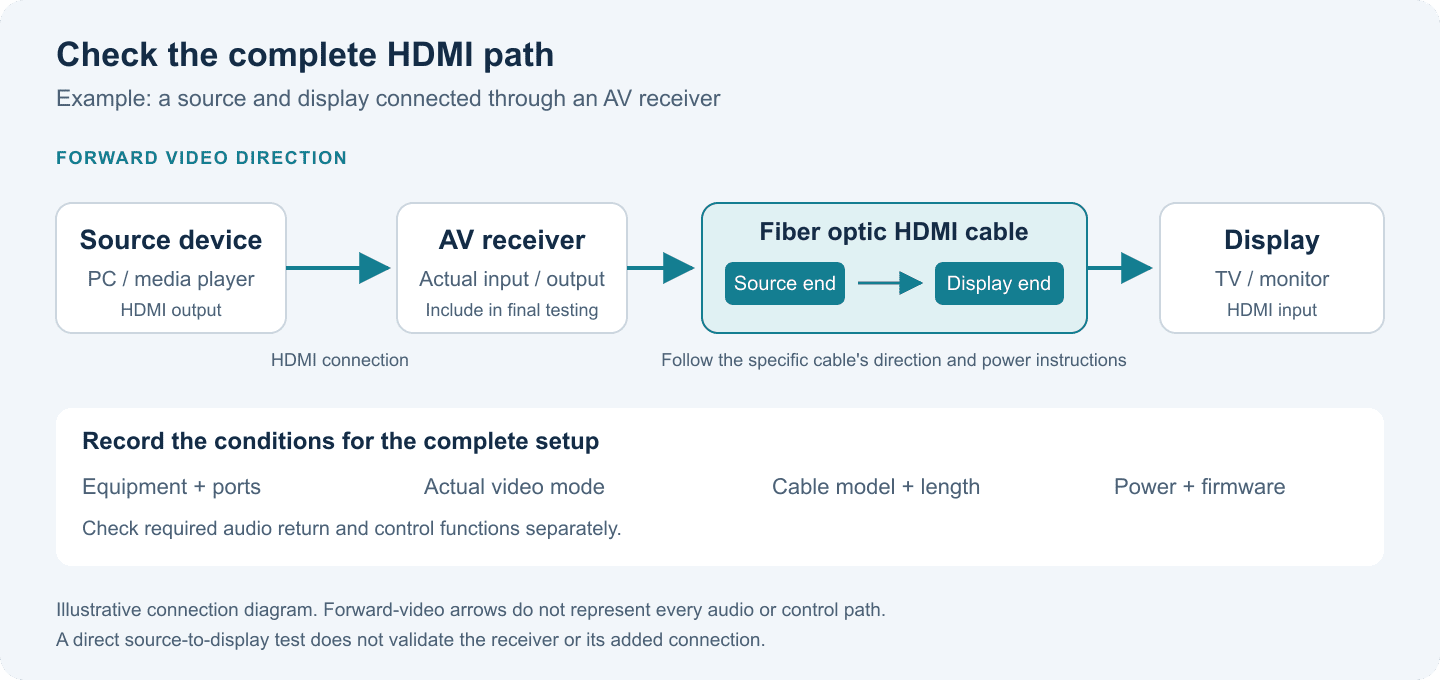
Example signal path. The fiber optic cable is one part of the complete connection; include the receiver and both HDMI connections in final validation. The arrow shows forward video direction, not every audio or control path.
- Equipment and ports: Record the models and actual ports of the source, display, AV receiver, switch, adapter or wall connection.
- Target video mode: Specify resolution, refresh rate, color depth and color format, plus required features such as HDR or VRR. “HDMI 2.1” alone does not define the requirement.
- Length and route: Measure the installed path, including vertical runs and service slack. Check the cable model’s bend and installation requirements.
- Direction and power: Follow the Source and Display/Sink markings and the model’s instructions. Confirm whether auxiliary power is needed.
- Audio return and control: List eARC or CEC (Consumer Electronics Control) requirements separately. Testing forward video does not check every return or control function.
For a directional active cable, a plug fitting a port does not establish that the cable is connected the right way around. If a product uses the specific HDMI Cable Power feature, both the cable and source must support it. Drawing power from an HDMI port should not automatically be described as support for that feature. See the HDMI Cable Power explanation.
Consider a media player connected to a meeting-room display through an AV receiver. A direct player-to-display test can help establish a baseline, but it does not cover the receiver in the finished setup. Include that device in the requirement before ordering samples.
Test before pulling the cable, and record the actual operating mode
On delivery, check the physical model, length and verification information before functional testing. For concealed or difficult-to-replace runs, test before pulling the cable into a conduit and repeat the checks after installation.
First establish that the equipment can run the target mode. Use a known-working connection and follow the equipment manufacturer’s instructions to check port capabilities and output settings. If there is no picture, use an available working display or the manufacturer’s display-recovery procedure to check the settings.
Connect the cable under evaluation and confirm the mode actually in use. Check resolution, refresh rate and available color information through the source or display. Use appropriate test equipment where needed. If the system falls back to a lower mode, a visible picture is not a pass for the target mode.
Add the final intermediate devices and required functions. Validate the receiver, switch and adapters that will be installed, along with the required HDR, VRR, audio return and control functions. Agree on test durations and repetitions for continuous operation, power cycling, standby recovery and input switching based on the project’s use.
Keep a record of:
- Cable model and length, plus sample identification where available.
- Equipment, ports, firmware versions and connection path.
- Power arrangement, target mode and observed operating mode.
- Test duration, repetitions, results and any interruptions or other anomalies.
If a black screen or flicker occurs, check direction, power and settings first, then change one condition at a time where practical. Removing an intermediate device, substituting a known-working cable, or lowering the output mode can help narrow the problem.
Recovery at a lower mode shows that the change affected the outcome; it does not identify the root cause by itself. Recovery after a cable swap also needs to be interpreted in the context of the connections and test conditions.
A functional test establishes how that sample performed under the recorded conditions. It does not replace certification or establish full bandwidth, every length, or compatibility with all equipment. For routing and installation checks, use the fiber optic HDMI cable installation checklist.
Connect sample approval to the bulk-order specification
For brand procurement and OEM/ODM projects, carry the findings into the purchase specification: exact model and length, certification claim and scope, approved sample, agreed validation conditions, packaging identification and batch traceability.
For private-label orders, clarify how the delivered brand, sales model and length correspond to the certification verification information. If the supplier provides records for another brand, model or length, request an explanation rather than assuming those records cover the intended product.
Keep actual sample results and anomalies separate from planned tests. Agree on notification and reassessment if the delivered design changes, including its construction, key components or power arrangement. This makes it easier to connect the certification information, approved sample and bulk delivery.
To discuss a fiber optic HDMI requirement, explore the Smartavlink HDMI cable range and provide your equipment models, installed cable length, target video mode, and audio return or control needs. These details provide a starting point for product selection, sample validation and OEM/ODM discussions. Confirm certification and performance against the specific model, length and supporting records.